> ## Documentation Index
> Fetch the complete documentation index at: https://docs.larafast.com/llms.txt
> Use this file to discover all available pages before exploring further.
# Products
> Product listings from users
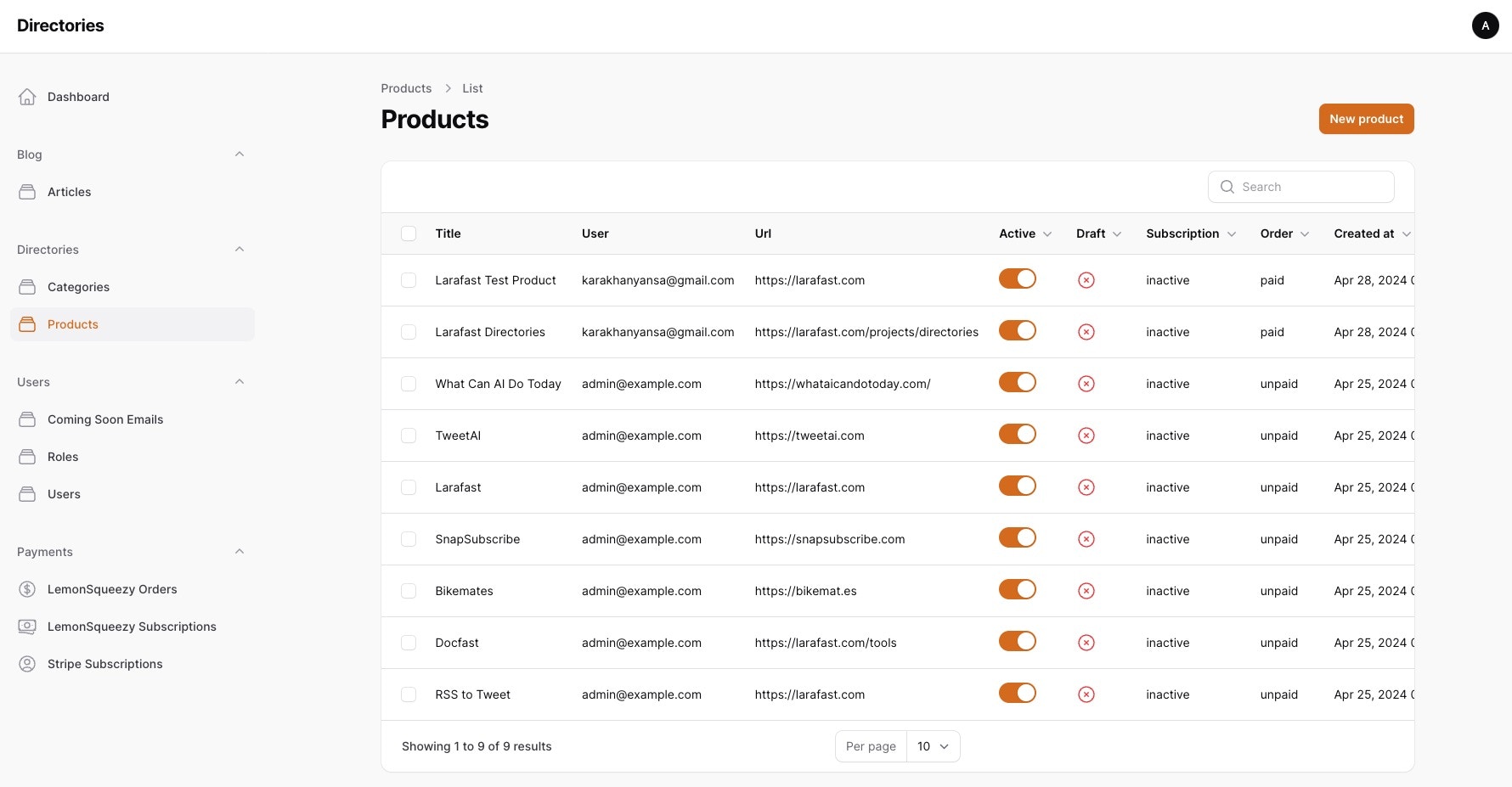
When user submits a product, it will be listed here for admin to review and approve.
### Features
* View all products submitted by users
* Approve or reject products
* View product details
* Edit product details
* Delete product
 ### Initial Setup
For initial setup, change the products info in `database/seeders/ProductSeeder.php`
file and run the seeder command to add to the database.
```bash theme={null}
php artisan db:seed --class=ProductSeeder
```
```php database/seeders/ProductSeeder.php theme={null}
'Larafast',
'logo_url' => 'https://placehold.co/400',
'description' => 'Laravel SaaS Starter Kit',
'short_description' => 'Laravel SaaS Starter Kit',,
'URL' => 'https://larafast.com',
'active' => true,
],
];
$user = User::role('admin')->first();
foreach ($products as $product) {
$user->products()->create($product);
}
}
}
```
All the products added by admin will be automatically displayed in the products page.
### Submitting Products from User
Once user subscribes to the plans, they can submit their products from the dashboard.
There are pre-defined plans for users, subscription per product or one-time payment per product. Details about Plans can be found in the [Plans](/fast-projects/directories/features/plans) page.
### Approving Products
When user submits a product, it will be listed as draft. Admin will receive a notification via email about the new product submission.
Admin can view the product details and approve or reject the product.
To enable email notifications, configure the mail settings in the `.env` file and add `ADMIN_EMAIL=your_email@gmail.com` to the `.env` file.
After approval, product will be listed in the products page.
### Products that will be displayed
Only the products that has been added by admin, or approved and paid will be displayed in the products page.
That part is controlled with `subscribed` and `ordered` scopes from the `Product` model and used in the `Products` livewire component.
```php app/Models/Product.php theme={null}
whereHas('subscription', static fn ($query) => $query->where('status', 'active'));
}
public function scopeOrdered($query)
{
return $query->whereHas('order', static fn ($query) => $query->where('status', 'paid'));
}
...
```
```php app/Livewire/Products.php theme={null}
search)
->active()
->where(function ($query) {
return $query
->where(fn ($query) => $query->subscribed()) // if you are using subscriptions
->orWhere(fn ($query) => $query->ordered()) // if you are using single time purchases
->orWhere(fn ($query) => $query->byAdmin());
})
->when($this->category,
static fn ($query, $category) => $query->whereHas('categories', fn ($query) => $query->where('slug', $category))
)
->with('categories')
->latest()
->get();
return view('livewire.products', [
'products' => $products,
]);
}
}
```
When user don't make payment for product, it will be listed as draft.
User can click "Submit for Moderation" button, after which will be redirected to the payment page.
"Submit for Moderation" route is protected with middleware.
For one-time payment use `\App\Http\Middleware\HasOrderForProduct::class` and for subscription use `\App\Http\Middleware\HasSubscriptionForProduct::class` middleware.
```php routes/web.php theme={null}
Route::middleware([\App\Http\Middleware\HasOrderForProduct::class])->group(function () {
Route::get('product/{product:slug}/submit-for-moderation', [ProductController::class, 'submitForModeration'])
->name('product.submit-for-moderation');
});
```
### Initial Setup
For initial setup, change the products info in `database/seeders/ProductSeeder.php`
file and run the seeder command to add to the database.
```bash theme={null}
php artisan db:seed --class=ProductSeeder
```
```php database/seeders/ProductSeeder.php theme={null}
'Larafast',
'logo_url' => 'https://placehold.co/400',
'description' => 'Laravel SaaS Starter Kit',
'short_description' => 'Laravel SaaS Starter Kit',,
'URL' => 'https://larafast.com',
'active' => true,
],
];
$user = User::role('admin')->first();
foreach ($products as $product) {
$user->products()->create($product);
}
}
}
```
All the products added by admin will be automatically displayed in the products page.
### Submitting Products from User
Once user subscribes to the plans, they can submit their products from the dashboard.
There are pre-defined plans for users, subscription per product or one-time payment per product. Details about Plans can be found in the [Plans](/fast-projects/directories/features/plans) page.
### Approving Products
When user submits a product, it will be listed as draft. Admin will receive a notification via email about the new product submission.
Admin can view the product details and approve or reject the product.
To enable email notifications, configure the mail settings in the `.env` file and add `ADMIN_EMAIL=your_email@gmail.com` to the `.env` file.
After approval, product will be listed in the products page.
### Products that will be displayed
Only the products that has been added by admin, or approved and paid will be displayed in the products page.
That part is controlled with `subscribed` and `ordered` scopes from the `Product` model and used in the `Products` livewire component.
```php app/Models/Product.php theme={null}
whereHas('subscription', static fn ($query) => $query->where('status', 'active'));
}
public function scopeOrdered($query)
{
return $query->whereHas('order', static fn ($query) => $query->where('status', 'paid'));
}
...
```
```php app/Livewire/Products.php theme={null}
search)
->active()
->where(function ($query) {
return $query
->where(fn ($query) => $query->subscribed()) // if you are using subscriptions
->orWhere(fn ($query) => $query->ordered()) // if you are using single time purchases
->orWhere(fn ($query) => $query->byAdmin());
})
->when($this->category,
static fn ($query, $category) => $query->whereHas('categories', fn ($query) => $query->where('slug', $category))
)
->with('categories')
->latest()
->get();
return view('livewire.products', [
'products' => $products,
]);
}
}
```
When user don't make payment for product, it will be listed as draft.
User can click "Submit for Moderation" button, after which will be redirected to the payment page.
"Submit for Moderation" route is protected with middleware.
For one-time payment use `\App\Http\Middleware\HasOrderForProduct::class` and for subscription use `\App\Http\Middleware\HasSubscriptionForProduct::class` middleware.
```php routes/web.php theme={null}
Route::middleware([\App\Http\Middleware\HasOrderForProduct::class])->group(function () {
Route::get('product/{product:slug}/submit-for-moderation', [ProductController::class, 'submitForModeration'])
->name('product.submit-for-moderation');
});
```