> ## Documentation Index
> Fetch the complete documentation index at: https://docs.larafast.com/llms.txt
> Use this file to discover all available pages before exploring further.
# LemonSqueezy
> Documentation for Larafast
### Connect LemonSqueezy to Project
1. Create a [LemonSqueezy Account](https://www.lemonsqueezy.com/) and set up your store
### Setup API Keys
To connect LemonSqueezy to the Larafast project you need to set API keys.
1. Create an API token in your account from [https://app.lemonsqueezy.com/settings/api](https://app.lemonsqueezy.com/settings/api)
2. Add `LEMON_SQUEEZY_API_KEY=` variable to .env file with API key
3. Add Store ID to .env `LEMON_SQUEEZY_STORE=`
You can find your store ID in your [Settings->Stores](https://app.lemonsqueezy.com/settings/stores) page
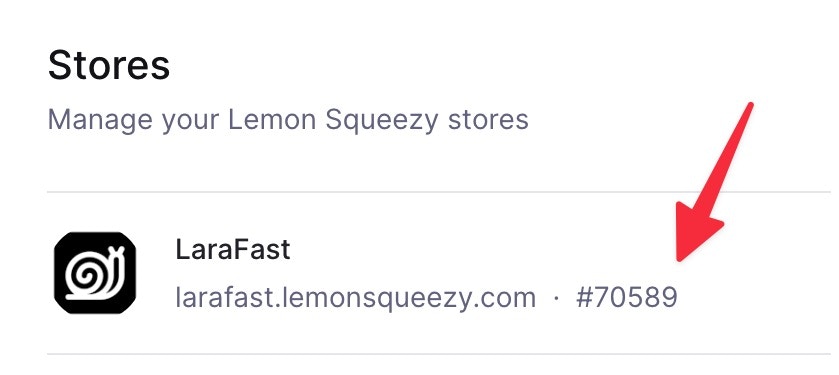 P.S. Use it without #, (made that mistake by myself :D )
### Migrations
To publish LemonSqueezy migration files, run the following command
```bash theme={null}
php artisan vendor:publish --tag="lemon-squeezy-migrations"
```
### Subscriptions
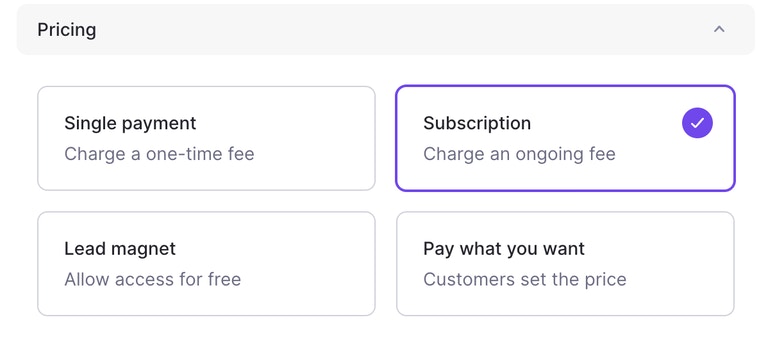
Create your products in LemonSqueezy -> [https://app.lemonsqueezy.com/products](https://app.lemonsqueezy.com/products) and choose "Subscription" for the pricing option.
P.S. Use it without #, (made that mistake by myself :D )
### Migrations
To publish LemonSqueezy migration files, run the following command
```bash theme={null}
php artisan vendor:publish --tag="lemon-squeezy-migrations"
```
### Subscriptions
Create your products in LemonSqueezy -> [https://app.lemonsqueezy.com/products](https://app.lemonsqueezy.com/products) and choose "Subscription" for the pricing option.
 After the product is created, copy the Product ID and Variant ID to use in the subscription checkout URL.\
To find a Product ID and Variant ID, go to your products page-> [https://app.lemonsqueezy.com/products](https://app.lemonsqueezy.com/products)
After the product is created, copy the Product ID and Variant ID to use in the subscription checkout URL.\
To find a Product ID and Variant ID, go to your products page-> [https://app.lemonsqueezy.com/products](https://app.lemonsqueezy.com/products)
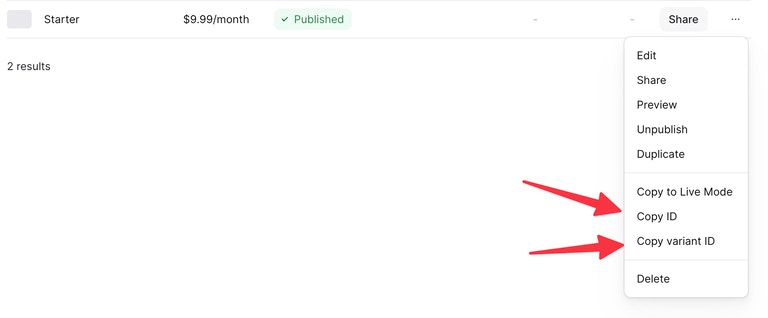 Unlike Stripe, LemonSqueezy requires and product and variant ID to be sent for checkout.
Checkout URL:
```php web.php theme={null}
Route::get('subscription-checkout/{productId}/{variantId}', [LemonSqueezyController::class, 'subscriptionCheckout'])->name('subscription.checkout');
```
**That's it. You are ready to accept subscriptions 🙌**
### Single Payment Products
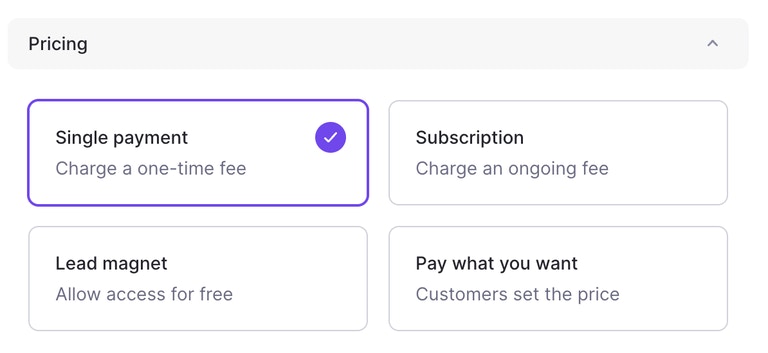
Create your products in LemonSqueezy -> [https://app.lemonsqueezy.com/products](https://app.lemonsqueezy.com/products) and choose "Single Payment" for the pricing option.
Unlike Stripe, LemonSqueezy requires and product and variant ID to be sent for checkout.
Checkout URL:
```php web.php theme={null}
Route::get('subscription-checkout/{productId}/{variantId}', [LemonSqueezyController::class, 'subscriptionCheckout'])->name('subscription.checkout');
```
**That's it. You are ready to accept subscriptions 🙌**
### Single Payment Products
Create your products in LemonSqueezy -> [https://app.lemonsqueezy.com/products](https://app.lemonsqueezy.com/products) and choose "Single Payment" for the pricing option.
 After the product is created, copy the Variant ID to use in the product checkout URL.\
To find a Variant ID, go to your products page-> [https://app.lemonsqueezy.com/products](https://app.lemonsqueezy.com/products)
After the product is created, copy the Variant ID to use in the product checkout URL.\
To find a Variant ID, go to your products page-> [https://app.lemonsqueezy.com/products](https://app.lemonsqueezy.com/products)
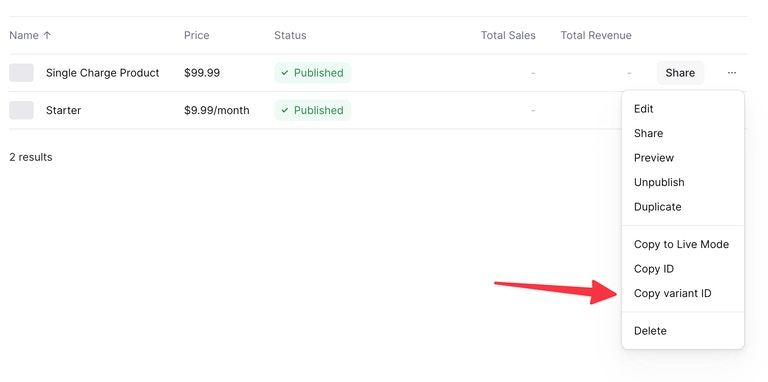 For Single Payment products, you need only variant ID
Checkout URL:
```php web.php theme={null}
Route::get('product-checkout/{variantId}', [LemonSqueezyController::class, 'productCheckout'])->name('product.checkout');
```
If you want to have a product checkout without logged in users, use LemonSqueezyService.php to retrieve products and product buy now links.
#### LemonSqueezy URL's
Larafast comes with all URL's pre-defined, you can find them in **routes/web.php**
```php web.php theme={null}
Route::prefix('lemonsqueezy')->name('lemonsqueezy.')->group(function () {
Route::get('subscription-checkout/{productId}/{variantId}', [LemonSqueezyController::class, 'subscriptionCheckout'])->name('subscription.checkout');
// If your product checkout does not require auth user,
// move this part outside "auth:sanctum" middleware and change the logic inside method
Route::get('product-checkout/{variantId}', [LemonSqueezyController::class, 'productCheckout'])->name('product.checkout');
Route::get('billing', [LemonSqueezyController::class, 'billing'])->name('billing'); // Redirects to Customer Portal
});
```
### Middleware
Use pre-defined `Http/Middleware/Subscribed` middleware for subscription-protected routes.
```php web.php theme={null}
Route::middleware([Subscribed::class])->group(function () {
// Add endpoints that are only for subscribed users
});
```
### Customer Portal
To redirect users to their Customer Portal for Subscription and Orders management use /billing route
```php web.php theme={null}
Route::get('billing', [LemonSqueezyController::class, 'billing'])->name('billing'); // Redirects to Customer Portal
```
### Webhooks
Finally, make sure to set up incoming webhooks. This is both needed in development and production.
**Webhooks In Development**
The easiest way to set this up while developing your app is with the `php artisan lmsqueezy:listen` command that ships with this package. This command will setup a webhook through the Lemon Squeezy API, start listening for any events and remove the webhook when quitting the command.
```bash theme={null}
php artisan lmsqueezy:listen
```
Although this command should always cleanup the webhook after itself, you may wish to cleanup any lingering webhooks with the `--cleanup` flag:
```bash theme={null}
php artisan lmsqueezy:listen --cleanup
```
Currently, this command supports [Ngrok](https://ngrok.com/) and [Expose](https://github.com/beyondcode/expose).
**Webhooks In Production**
For production, we'll need to set things manually. Go to [your Lemon Squeezy's webhook settings](https://app.lemonsqueezy.com/settings/webhooks) and point the URL to your app's domain. The path you should point to is `/lemon-squeezy/webhook` by default. Make sure to select all event types.
We also very much recommend to [verify webhook signatures](https://github.com/lmsqueezy/laravel#verifying-webhook-signatures) in production.
Add `LEMON_SQUEEZY_SIGNING_SECRET=` in your .env file
To read more about Laravel and LemonSqueezy integration check the LemonSqueezy Laravel package doc-> [https://github.com/lmsqueezy/laravel](https://github.com/lmsqueezy/laravel)
For Single Payment products, you need only variant ID
Checkout URL:
```php web.php theme={null}
Route::get('product-checkout/{variantId}', [LemonSqueezyController::class, 'productCheckout'])->name('product.checkout');
```
If you want to have a product checkout without logged in users, use LemonSqueezyService.php to retrieve products and product buy now links.
#### LemonSqueezy URL's
Larafast comes with all URL's pre-defined, you can find them in **routes/web.php**
```php web.php theme={null}
Route::prefix('lemonsqueezy')->name('lemonsqueezy.')->group(function () {
Route::get('subscription-checkout/{productId}/{variantId}', [LemonSqueezyController::class, 'subscriptionCheckout'])->name('subscription.checkout');
// If your product checkout does not require auth user,
// move this part outside "auth:sanctum" middleware and change the logic inside method
Route::get('product-checkout/{variantId}', [LemonSqueezyController::class, 'productCheckout'])->name('product.checkout');
Route::get('billing', [LemonSqueezyController::class, 'billing'])->name('billing'); // Redirects to Customer Portal
});
```
### Middleware
Use pre-defined `Http/Middleware/Subscribed` middleware for subscription-protected routes.
```php web.php theme={null}
Route::middleware([Subscribed::class])->group(function () {
// Add endpoints that are only for subscribed users
});
```
### Customer Portal
To redirect users to their Customer Portal for Subscription and Orders management use /billing route
```php web.php theme={null}
Route::get('billing', [LemonSqueezyController::class, 'billing'])->name('billing'); // Redirects to Customer Portal
```
### Webhooks
Finally, make sure to set up incoming webhooks. This is both needed in development and production.
**Webhooks In Development**
The easiest way to set this up while developing your app is with the `php artisan lmsqueezy:listen` command that ships with this package. This command will setup a webhook through the Lemon Squeezy API, start listening for any events and remove the webhook when quitting the command.
```bash theme={null}
php artisan lmsqueezy:listen
```
Although this command should always cleanup the webhook after itself, you may wish to cleanup any lingering webhooks with the `--cleanup` flag:
```bash theme={null}
php artisan lmsqueezy:listen --cleanup
```
Currently, this command supports [Ngrok](https://ngrok.com/) and [Expose](https://github.com/beyondcode/expose).
**Webhooks In Production**
For production, we'll need to set things manually. Go to [your Lemon Squeezy's webhook settings](https://app.lemonsqueezy.com/settings/webhooks) and point the URL to your app's domain. The path you should point to is `/lemon-squeezy/webhook` by default. Make sure to select all event types.
We also very much recommend to [verify webhook signatures](https://github.com/lmsqueezy/laravel#verifying-webhook-signatures) in production.
Add `LEMON_SQUEEZY_SIGNING_SECRET=` in your .env file
To read more about Laravel and LemonSqueezy integration check the LemonSqueezy Laravel package doc-> [https://github.com/lmsqueezy/laravel](https://github.com/lmsqueezy/laravel)